Key takeaways
- Compact stick design, plugs directly into HDMI with a short extender included
- Includes a captive-portal browser for hotel and airport Wi-Fi logins
- Simple remote, long battery life on 2 AA batteries
- 4K HDR10 and Dolby Vision support
Hotel TVs are a lottery — some have a half-decent smart platform, most have a clunky cable-box interface with no Netflix app and a remote missing half its buttons. A streaming stick that fits in a laptop bag solves that instantly, as long as it can get through a hotel’s captive-portal Wi-Fi login screen. Here’s what travels well.
Roku Streaming Stick 4K
- Compact stick design, plugs directly into HDMI with a short extender included
- Includes a captive-portal browser for hotel and airport Wi-Fi logins
- Simple remote, long battery life on 2 AA batteries
- 4K HDR10 and Dolby Vision support
Pros: Built-in web browser handles hotel Wi-Fi login pages that trip up other sticks; lightweight and genuinely pocket-friendly; no subscription or account lock-in required to use core apps
Cons: No Ethernet option if hotel Wi-Fi is unreliable; voice remote range can be flaky near metal TV mounts
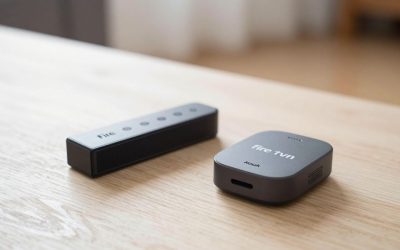
Amazon Fire TV Stick 4K
- Compact HDMI stick, USB-C power
- Alexa voice remote with TV power/volume controls
- Supports Wi-Fi 6 for faster hotel network handshakes
- Mirroring support from Fire tablets and some Android phones
Pros: Widest app catalog of any stick, including niche travel/airline apps; Alexa remote can control hotel TV volume directly in many cases
Cons: Needs an Amazon account signed in to get full functionality; hotel captive portals sometimes block it where Roku’s browser gets through
Google Chromecast with Google TV (HD)
- Compact stick, lower-cost HD version available alongside the 4K model
- Google TV interface with cross-app search
- Cast support from any Android or iOS phone on the same network
Pros: Cheapest reliable 1080p pick for travel if 4K doesn’t matter on a hotel TV; easy phone-based casting as a backup input method
Cons: HD model caps at 1080p; like other sticks, performance depends on hotel Wi-Fi quality and captive portal compatibility
Buying Tips
- A built-in captive-portal browser (Roku has one) matters more while traveling than raw processing power — it’s the difference between a stick working at all on hotel Wi-Fi and not connecting at all.
- Bring a short HDMI extender cable even if the stick includes one; some hotel TVs have HDMI ports recessed behind wall mounts where a rigid stick won’t physically fit.
- Log out of streaming accounts before checkout, or use a guest/travel profile — sticks plugged into hotel TVs stay signed in for the next guest otherwise.
FAQ
Which stick works best with difficult hotel Wi-Fi?
Roku’s built-in browser for captive portal logins is the most consistently reported workaround for hotel sign-in pages among the major stick platforms.
Do I need a power outlet or can the stick run off the TV’s USB port?
Most hotel TVs have a USB port that supplies enough power for a Fire TV Stick or Chromecast; Roku sticks sometimes need the included AC adapter if the TV’s USB output is too weak.
Is it safe to leave a stick logged into streaming apps in a hotel room?
Not recommended for extended stays — use a travel-specific profile or log out before you leave so the next guest can’t access your account.
Amazon Fire TV Stick Lite
- Smaller, lighter version of the standard Fire TV Stick
- 1080p HD output, Alexa voice remote without TV power/volume buttons
- Lowest price point in the current Fire TV Stick lineup
Pros: Cheapest reasonable backup stick to leave permanently packed in a travel bag; still gets the full Fire TV app catalog despite capping at 1080p
Cons: No 4K support, which matters less on most hotel TVs but is a real limitation if the hotel happens to have a newer 4K set
More buying tips
Keep a short USB-C-to-USB-A cable and a small USB power adapter in your travel bag alongside the stick itself — hotel TVs vary wildly in whether their USB port outputs enough power, and having a backup power source avoids a stick that keeps rebooting mid-show because the TV’s port can’t supply steady power.
Will a travel streaming stick work on an airplane’s in-seat entertainment system?
No — in-seat airplane screens are closed systems that don’t accept external HDMI input in almost all cases; travel streaming sticks are strictly for hotel rooms, Airbnb TVs, or any HDMI-equipped television, not in-flight seatback screens.
Do I need a VPN when using a streaming stick on hotel Wi-Fi?
Not required for the stick to function, but many travelers add one for privacy on shared hotel networks and to access home-region content libraries while abroad; just confirm the specific streaming apps you use allow VPN connections, since some detect and block them.
Should I bring my own HDMI cable when traveling with a streaming stick?
Most sticks, including the Roku Streaming Stick 4K and Fire TV Stick 4K, plug directly into the TV’s HDMI port without a separate cable, but packing a short HDMI extender is worth it regardless, since some hotel TVs recess their HDMI ports behind a wall mount or tight cabinet where a rigid stick body won’t physically clear the opening.
Do travel streaming sticks need their own remote, or can I use a universal travel remote?
Each stick comes with its own dedicated remote, and there isn’t a practical universal remote built for travel use the way there is for a permanent living room setup, so the included remote (or the manufacturer’s companion phone app, which most support as a backup) is the realistic option on the road.
Is it worth buying a dedicated travel stick if I already own one at home?
Yes for frequent travelers — leaving a cheap, dedicated stick permanently packed removes the friction of unplugging and repacking your main living room device before every trip, and a budget pick like the Fire TV Stick Lite is inexpensive enough that owning two devices for two purposes makes more practical sense than shuffling one stick back and forth.
Write Your Review
No reviews yet. Be the first to share your experience!