Key takeaways
- Check your TV’s HDMI port is free and unobstructed — some sticks need a short HDMI extender to fit behind recessed or wall-mounted TVs.
- Confirm your home Wi-Fi reaches the TV’s location reliably; Roku Ultra’s Ethernet port is the better fix if the signal is weak rather than buying a faster stick.
- Match the device to whichever voice assistant (Alexa vs Google) you already use for smart home control, since that integration is where the day-to-day experience differs most.
- If the TV itself only supports 1080p, skip the 4K-capable models entirely and save the difference.
Fire TV Stick and Roku are the two most common streaming devices on the market, and most first-time buyers end up choosing between them before they even consider anything else. Both plug into an HDMI port in seconds, both run 4K HDR content on their higher-end models, and both get regular software updates years after launch. The real differences come down to ecosystem fit, interface philosophy, and how much the home screen pushes recommendations versus staying out of the way — not raw hardware capability.
Amazon Fire TV Stick 4K Max
The Fire TV Stick 4K Max is Amazon’s flagship stick, built around Wi-Fi 6E and a noticeably faster processor than the entry-level Fire TV Stick HD. It is deeply integrated with Alexa, Prime Video, and the rest of Amazon’s ecosystem, so if you already own Echo speakers or shop on Amazon regularly, voice control and purchase history carry over cleanly without extra setup. The home screen leans harder into content recommendations and sponsored rows than Roku’s does, which is the most common complaint in long-term reviews, but app switching, search, and 4K HDR playback are consistently reported as fast and reliable across firmware updates.
Check Amazon Fire TV Stick 4K Max on Amazon
Roku Streaming Stick 4K / Roku Ultra
Roku’s interface is the most neutral of any major streaming platform — it is not built to favor one studio’s content over another, and the home screen is organized as a simple grid of apps rather than an endless recommendation feed. The Roku Streaming Stick 4K covers the stick form factor at a lower price point, while the Roku Ultra box adds Ethernet for a more stable connection, a lost-remote finder that chirps when you press a button on the box, and a headphone jack built directly into the remote for private listening without disturbing anyone else in the room. Both support Dolby Vision and HDR10+ on compatible content, and both inherit Roku’s large, long-standing app catalog.
Check Roku Streaming Stick 4K on Amazon
Where each one wins
Fire TV Stick makes the most sense if you are already inside Amazon’s ecosystem: Prime Video as a primary service, Alexa-enabled smart home gear around the house, or Echo speakers elsewhere that you want the TV’s voice remote to talk to. Roku makes more sense if you subscribe to several unrelated streaming services and want a neutral launcher that treats every app the same way, or if you specifically want Ethernet and a quieter, less ad-heavy home screen. Picture quality on supported HDR content is close enough between the two that most people will not notice a difference in a side-by-side comparison; the decision mostly comes down to interface preference, remote features, and which voice assistant you already rely on daily.
What about Apple TV or Google TV Streamer?
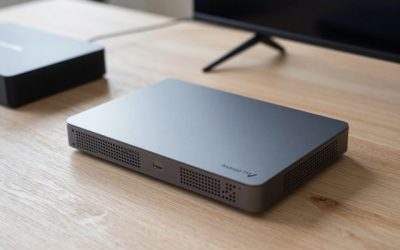
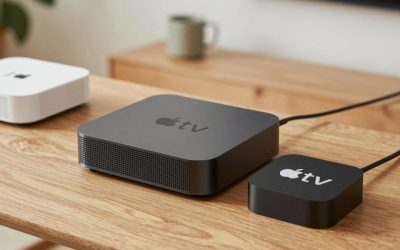
If you own an iPhone or use HomeKit, Apple TV 4K is worth comparing separately — it costs more but integrates with AirPlay and Apple’s ecosystem the same way Fire TV integrates with Alexa, and it is consistently the fastest device in app-launch benchmarks. Google TV Streamer plays the same ecosystem role for Android and Google Home households, plugging directly into an outlet rather than relying on a stick dangling behind the TV. For most first-time buyers who are not locked into either of those ecosystems, the Fire TV Stick vs Roku decision covers the two most practical, lowest-friction, and lowest-cost options on the market today.
What’s actually in the box, and setup time
Both Fire TV Stick and Roku ship with the stick itself, a voice remote, batteries, and an HDMI extender cable for TVs with recessed or hard-to-reach ports. Initial setup on either platform takes roughly ten to fifteen minutes end to end — connecting to home Wi-Fi, signing into existing streaming accounts, and letting the device pull its first round of software updates before first use. Neither requires any tools, drilling, or professional installation, which is part of why streaming sticks remain one of the easiest upgrades in the entire home entertainment category for someone setting one up for the very first time.
Quick buying checklist
- Check your TV’s HDMI port is free and unobstructed — some sticks need a short HDMI extender to fit behind recessed or wall-mounted TVs.
- Confirm your home Wi-Fi reaches the TV’s location reliably; Roku Ultra’s Ethernet port is the better fix if the signal is weak rather than buying a faster stick.
- Match the device to whichever voice assistant (Alexa vs Google) you already use for smart home control, since that integration is where the day-to-day experience differs most.
- If the TV itself only supports 1080p, skip the 4K-capable models entirely and save the difference.
Bottom line: match the device to the voice assistant and ecosystem you already use daily rather than chasing marginal spec differences — both platforms run the same major streaming apps, both receive regular updates, and both will look essentially identical on a typical living-room TV.
Write Your Review
No reviews yet. Be the first to share your experience!